Repairing an Akira DVD Player

This was my first time trying to really repair something, and I’m forced to do it. It’s an Akira DVD player that is used as an audio CD player.

When I received the unit, I plugged it in and turned it on. Hmmm… nothing happened, so I opened it up to see what’s wrong. Apparently it has bulged capacitors, which is quite a common problem.

I guess the main cause was the 100μF smoothing capacitor that’s placed directly after the rectifier bridge. You can see the rectifier chip to the right of the large capacitor.
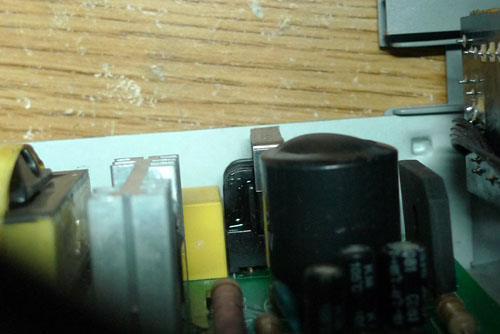
There were also some that were around the board that may not be related, but I just replaced them all at one go anyways.

I tried to remove the solder using a spring-powered desoldering pump but I couldn’t remove the solder from some holes. Instead I just pushed the component lead through while heating up the solder, which is a really bad way to solder but hey, any more heat I apply could just damage the PCB traces.

After replacing the capacitors, the unit managed to power up. However, the LED that was powering the LCD screen backlight was flickering. I found that odd actually, but I really didn’t want to investigate it. Also, the springy audio connectors for the speaker wires at the back were also broken, but I have no idea where to find a replacement for it.

The amount of work required? The capacitors totaled to S$6, but I made 2 trips to get the components (because I missed out some capacitors), and I spent an evening replacing the capacitors. If I had to spend more time figuring out the problems, it would have been longer.

I think such repairs are really not worth it because you have to spend time understanding the circuit before you can really fix the problem (in the case of the LED backlight). If it was something antique and worth fixing it wouldn’t have been so bad, but this is just some cheap off-the-shelf audio system you can buy easily.

Oh well, at least it’s done and I can get it off my hands.
iOS Profiles & Encrypted Backups

When I got my iPhone, it uses a 4-digit passcode to protect its contents. Unsatisfied with this, I found the iPhone Configuration Utility (iPCU), which was the only way at that time to enable complex passcodes (passwords) on the phone. After creating a profile and uploading it to the phone using the iPCU, my backups were all forced to be encrypted.

Encrypted backups are not good for tinkering because you need to decrypt the files before you can edit them, and you need to re-encrypt them for it to be restored to the phone. I’m not sure about the encryption scheme, or which programs can access encrypted backups since the encryption happens on the phone.

I don’t remember seeing an option in the iPCU that says “Force iTunes encryption” or similar, so why was this happening? Recently when I was digging through the iPhone OS Enterprise Deployment Guide, I found an important note, under “Backing Up a Device with iTunes”, that reads “If the device being backed up has any encrypted profiles installed, iTunes requires the user to enable backup encryption.”

If you upload any profiles using iPCU, it’s convenient – it goes into the phone directly, but at the same time it also encrypts the configuration for the phone.

For my new iOS devices I simply signed it, and uploaded onto a web server and accessed it from the device. This prevents the backups from being forced to be encrypted, but at the same time it creates a chicken and egg problem – how does my device access the web server without the WiFi profile settings?

I’ll look into that another time.

“Personal [WiFi] Hotspot” comes to iPhone 4 CDMA

Apple has just announced a new iPhone 4 hardware revision that allows it to be used on CDMA networks.

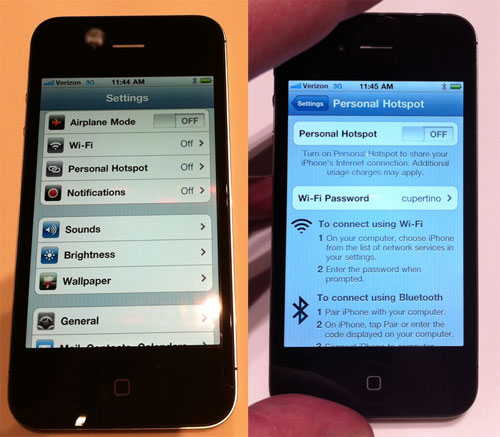
[photo stolen from Ars Technica]

Interestingly, the new iPhone comes with a Personal Hotspot preference that allows it to share its 3G connection over WiFi. Ars Technica has photos of the new preference menus. I must stress the photos shown here were not taken by me.

Of course the Android people have had this for a while (provided their phones could be updated to Froyo). They called it the Portable Wi-Fi hotspot.

I hope Apple rolls this out to the rest of the iPhone users, and hopefully if it isn’t enabled by default, it will have some secret pref that allows it to be activated easily.

RS232 converter + TTL-232R-3V3

If you’re into microcontrollers like me, you should have an FTDI breakout board or the more handy FTDI TTL-232R-3V3 cable. This cable integrates an FTDI USB-to-serial chip and terminates into a 6-pin header, with TTL in/outputs, ready to be interfaced to any microcontroller.

Recently I had to talk to an RS232 port. The voltage used by the RS232 port is anywhere from 7 to 15V (typically), and uses both positive and negative voltages, which cannot be directly interfaced with TTL. Most of my university friends who took microcontroller class previously bought an RS232-to-USB converter, since that’s what the trainer board (evaluation board) uses, but not me. So what should I do now?

Using a MAX232 (actually a HIN232) chip and 5 capacitors, I followed the recommended application circuit to build a level shifter. I laid out the circuit on a veroboard with a 6-pin header on one end for the TTL-232R-3v3 cable, and a 2×5 header for the RS232 port.

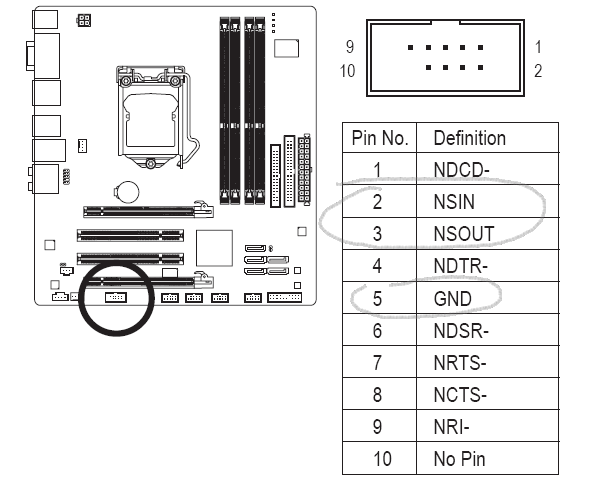
Since I ripped out many old computers with those serial port headers I decided to use it. The pinout for the RS232 port header is available in many motherboard manuals, including mine. The only pins (usually) of interest are circled. The pins are 2, 3 and 5 for receive, transmit and ground, respectively.

Continue reading

mdns-repeater: mDNS across subnets

Update 21-Sep-2011: Added an Installation section and updated the binaries on Bitbucket.

Update 20-Oct-2020: Moved repository to GitHub

As you may know, I have a couple of Apple devices. Apple is fond of using Multicast DNS (mDNS) for their service discovery. The recent addition to these services being AirPrint (wireless printing service) and AirPlay (wireless audio/video streaming) from your iOS devices.

My home is setup in such a way that the wired and wireless networks are on 2 separate subnets. mDNS uses a multicast address that is “administratively scoped”, meaning the packets will not travel across subnets. I tried fiddling around with iptables rules and looked around for how I can route these packets across the subnets, but to no avail.

There is another solution – a repeater daemon that sits on the router and repeats packets between the 2 subnets. Avahi is used to provide mDNS services and it has a reflector mode that does exactly this. A more lightweight solution was TiVoBridge, which supposedly performs the same task but it’s much smaller. I tried to compile and set up TiVoBridge, but it required a config file and I couldn’t really get it to work the way I wanted it to. There’s an even lighter-weight solution called SAY, but it uses libpcap.

Enter mdns-repeater – a small Linux daemon that does exactly what I want it to do. I have a Linksys WRT54G which runs dd-wrt. This program was intended to be compiled for and installed on the Linksys router. As with all other programs that run on the router, it requires no configuration.

The default dd-wrt configuration has 2 interfaces – vlan1 for the WAN interface and br0 for the wireless interface (and 4-port switch). The program accepts the arguments vlan1 and br0 and begins repeating packets from vlan1 to br0 and vice-versa. I can now get my iOS devices to detect wired servers like a print server for AirPrint.

mdns-repeater is released under GPLv2. Feel free to change it to repeat whatever protocol you want. Patches to add functionality and bug fixes are welcome. You can contact me via bitbucket.orggithub.com, or if you clone the repository my email is in the commits.

Continue reading