The Apple 30-pin Dock Connector

The 30-pin dock connector first appeared on the iPod 3G in 2003, and has been on all iPods, iPhones and iPads ever since, with the sole exception of the first generation iPod Shuffle. The first gen Shuffle looks like a thumbdrive (or what some would call a pen drive) and used a USB male connector, whereas the first and second generation iPods had a FireWire port at the top.

iPod Accessory Protocol

Since its introduction, Apple made several minor modifications to the electronics interface of the dock connector, but the physical connector itself remains unchanged. Collectively, this and the communications protocol is called the iPod Accessory Protocol (iAP).

Initially, they introduced different resistor values on the “accessory detect” pin when they allowed third-party companies to make docks and car adapters. At that time, the dock connector mainly had audio in and line out functionality (connected to the back of the docks), as well as a serial interface for remote control via the dock. The serial protocol was largely reverse-engineered by maushammer (website no longer accessible) and this guy here (I think he’s called Christoph but it’s not on that page). This was also used by car manufacturers to allow iPod playback control from buttons on the steering wheel.

When Apple released the iPod Video that was capable of playing videos in 2005, they added video out (composite and S-video), as well as an authentication chip to allow only authorized docks and cables to receive video out (including audio). Soon enough, China caught up with their release of “authorized” accessories, which contain the authentication chip that can be re-purposed for other use.
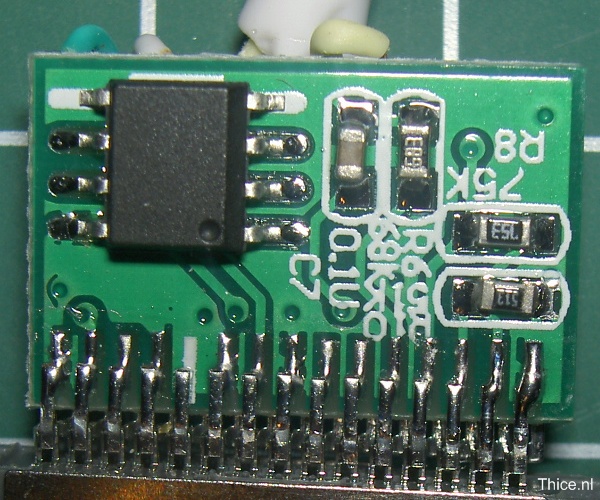
Authentication chip (image from thice.nl)

Presumably, that was also when they added USB support for iAP, which I’m pretty sure also requires an authentication chip. USB support would allow a host to communicate and control the iPod through a USB cable. My car stereo correctly recognizes the iPhone as an iPod over a USB cable.

The iPod Camera Connector was also introduced for the iPod Photo and iPod Video in 2005. This was a small “dongle” that has a dock connector on one end and a USB port on the other. Oddly, according to an Everymac article, later iPods released in 2006 do not support this accessory any more. It is unknown if they somehow switched the USB interface to host mode, or if they used a separate chip to emulate this.

In 2008, charging via FireWire was no longer supported with the introduction of the 2nd generation iPod Touch and 4th generation iPod Nano. The pins dedicated to FireWire in the dock connector are now unused.

Continue reading

DIY Optical Slave Flash

I found a couple of old disposable cameras in storage that I played around with 15 years ago, shorting the caps to make a loud bang, wiring up the flash trigger to a remote-controlled relay kit I had assembled. I thought I’d do something useful with them.

I decided to turn them into optical slave flashes, since on-camera flashes are not very flexible. I was thinking of a way to detect the camera flash so that the slave could be fired, maybe using an LDR with the ADC to detect an increase in light intensity? It turns out there’s an even easier way to do this – with an infrared sensor. Apparently when flash tubes are fired, they give off infrared which can be detected more reliably than light intensity changes. When I read about this, I tested it out with a simple Arduino sketch and it works as advertised.

Disposable cameras usually have metal contacts that are placed near the shutter mechanism. When the shutter opens, the contacts are closed and if the flash was charged it would fire. To control the flash firing, I replaced the contacts with an SCR.

Continue reading

Debugging Fun with JNI

Our proprietary system, written in a mix of Java and C++, was crashing quite often. It only started happening after some new features were added, so naturally that became the prime suspect, but my colleague claimed it was because the process ran out of memory.

I wrote a small test case to see if an out-of-memory situation would cause this, and true enough, it did. The JVM generated a crash log file that looked like this (I’ve omitted the unimportant parts):

#
# A fatal error has been detected by the Java Runtime Environment:
#
#  EXCEPTION_ACCESS_VIOLATION (0xc0000005) at pc=0x6d941e62, pid=996, tid=10040
#

---------------  T H R E A D  ---------------

Current thread (0x0b2dec00):  JavaThread "pool-1-thread-49" ...

siginfo: ExceptionCode=0xc0000005, reading address 0x00000000
...

Stack: [0x0b7e0000,0x0b830000],  sp=0x0b82d92c,  free space=310k
Native frames: (J=compiled Java code, j=interpreted, Vv=VM code, C=native code)
V  [jvm.dll+0xa1e62]
C  [JNITask.dll+0x1ec1]  Java_JNITask_doWork+0xc41
C  [JNITask.dll+0x1399]  Java_JNITask_doWork+0x119
j  JNITask.doWork()Ljava/util/Hashtable;+0
j  JNITask.run()V+31
j  java.util.concurrent.ThreadPoolExecutor$Worker.runTask(Ljava/lang/Runnable;)V+59
j  java.util.concurrent.ThreadPoolExecutor$Worker.run()V+28
j  java.lang.Thread.run()V+11
v  ~StubRoutines::call_stub
V  [jvm.dll+0xfad0b]
V  [jvm.dll+0x18c241]
...

It looks like the problem is occurring within a call made from C++ back into the JVM. After tracing the DLL file through IDA Pro, I found this code fragment:

jdoubleArray numbersArr = env->NewDoubleArray(DBL_ARR_SIZE);
env->SetDoubleArrayRegion(numbersArr, 0, DBL_ARR_SIZE-1, (jdouble *) f);

It looks like we skimped on error checking code. The newly-created numbersArr returned by the JVM wasn’t being checked. When the JVM ran out of memory, it failed to create the array and returned NULL, and this NULL went into the next JVM call.

The correct solution here is to check for NULL and return immediately. When we try to allocate the array and it fails due to insufficient memory, the JVM will record an exception but because the native code is still executing, this exception will not be thrown until the native code returns.

As soon as we returned from the native code, the JVM throws the exception:

Exception in thread "pool-1-thread-17" java.lang.OutOfMemoryError: Java heap space
        at JNITask.doWork(Native Method)
        at JNITask.run(Caller.java:23)
        at java.util.concurrent.ThreadPoolExecutor$Worker.runTask(Unknown Source)
        at java.util.concurrent.ThreadPoolExecutor$Worker.run(Unknown Source)
        at java.lang.Thread.run(Unknown Source)

Some people have suggested passing the -Xcheck:jni argument to the Sun/Oracle JVM to hunt down JNI issues. Let’s see how useful it is in our case:

WARNING in native method: JNI call made with exception pending
        at JNITask.doWork(Native Method)
        at JNITask.run(Caller.java:23)
        at java.util.concurrent.ThreadPoolExecutor$Worker.runTask(Unknown Source)
        at java.util.concurrent.ThreadPoolExecutor$Worker.run(Unknown Source)
        at java.lang.Thread.run(Unknown Source)

Hmmm it stopped the JVM from crashing, but I’m not sure if that would have helped if we didn’t know what to look out for. It’s basically complaining about the subsequent call after the call to NewDoubleArray failed.

In most cases, the lack of error checking would have gone unnoticed, but because of the amount of memory being consumed, the JVM eventually runs out of memory and increases the chances of this happening.

An alternative method could have been to throw an exception, but this requires you to use env->FindClass to first get a handle to the exception class, then calling env->ThrowNew to create an instance. I doubt it would work if the JVM was already running out of memory.

Logic Analyzer Software Review

I was looking into the Openbench Logic Sniffer (OLS) client, an open source logic analyzer software to be used with the Logic Sniffer from Dangerous Prototypes and Gadget Factory, so I thought it might be worthwhile to look at other alternatives, including commercial products. In the next few posts, it will probably become obvious why I’m doing this.

Since I do not have any of the hardware, I must make it clear that I am only reviewing the software that is meant to be used with their analyzers. Good logic analyzer products will usually make their software available free, with either some demo files or a means to generate random or test waveforms.
Continue reading

Voltage Regulation: Zener Diodes vs. LEDs

I was prototyping a circuit on a piece of veroboard using SMD components and I needed a 2V supply from my FTDI cable. Of course I didn’t have any SMD regulators handy, so I thought I would use the simplest regulator – a zener diode. But it’s not like I have a 2V zener diode lying around either, so I thought maybe I could use an LED instead, since its forward voltage is close to 2V (for the red/green ones).

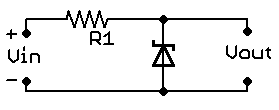
A zener regulator is set up like this:

The concept is simple: zener diodes are specially designed to have a specific breakdown voltage (in my case 2V) when put in reverse. The result is a 2V voltage drop across the diode, and hence, Vout. Since I didn’t have a zener diode, I thought I would use a regular LED in its place, but placed in forward bias (so that it lights up).
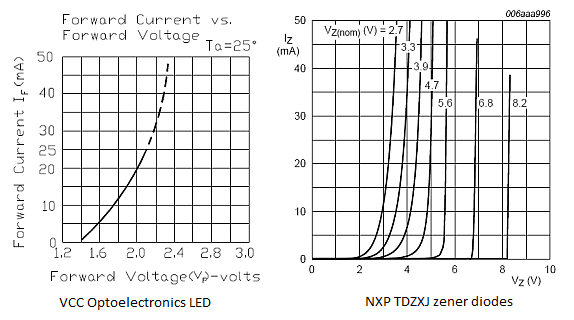
When I tested the circuit however, I realised the voltage drop across the LED was less than 2V. I missed an important point: the current-voltage curve.

Observe the LED current-voltage curve on the left and the zener diode current-voltage curve on the right. You will notice that the zener diode has a steeper curve compared to the LED. Apparently to avoid blinding myself, I had limited the LED current to about 10mA. I missed the fact that at 10mA the voltage drop across the LED is now only ~1.8V. To get 2V across the LED, you need at least 20mA, which would be too bright as an always-on indicator.

This also answers a question I previously had of whether I can use an LED in place of a zener diode for crude voltage regulation. One of the techniques used by VUSB devices to limit the D+ and D- voltage is to use a pair of 3.6V zener diodes (solution B). The SparkFun AVR Stick uses blue LEDs so that they also double as activity indicators, but from the user comments, it is clear that this causes problems.

If you want to use an LED for voltage regulation, remember to check the current-voltage curve.