My First Arduino

I finally bought myself an Arduino Uno this week.

“Wait a minute… then what have you been using?” I hear you ask. Previously I had access to an Arduino Duemilanove, and used it to burn the Optiboot bootloader onto an ATmega168 that I had. The Duemilanove board used an FTDI chip which had additional pins brought out to an unsoldered header marked as X3. Following this guide by Kimio Kosaka, I downloaded the precompiled avrdude for Windows and used it to program the ATmega168 via the X3 header.

The end result was a bare-bones Arduino that ran on a 12MHz crystal. The reason for 12MHz was because that was the maximum “safe” clock speed at 3.3V, which I used for a university project and have been using ever since. You can see it below, driving a HD47780 parallel LCD.
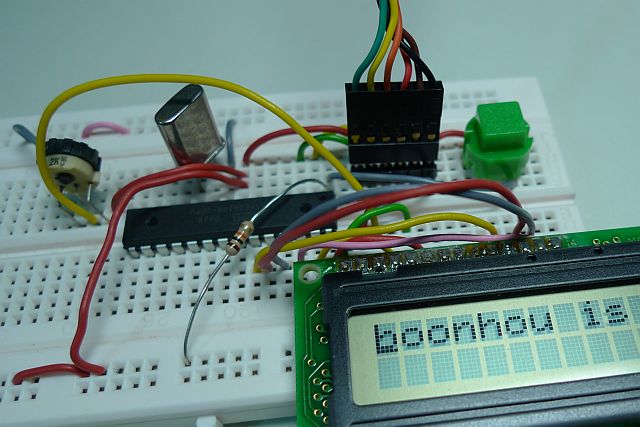
However, it’s a real chore to hook this up, especially since everything on the breadboard like the crystal, FTDI header and reset button and pullup resistor are all inserted like any other component. It is more convenient to have a ready-built board for prototyping, where you don’t have to worry about the Arduino components.

If you haven’t gotten an Arduino board yet, I highly suggest you get one. If you would like to hook it up on the breadboard similar to what I did, at least get the Really Bare Bones Board (RBBB) Kit.

Python bindings for iTunesMobileDevice.dll

Oddly enough I can’t seem to find a Python wrapper for iTunesMobileDevice.dll. I did manage to find a C# equivalent called Manzana though, which is quite widely used.

Anyhow, I bit the bullet and read through the ctypes documentation and wrote AMDevice.py which exposes some simple classes to handle connecting to an iPhone. I only implemented the minimal set of functions required to download and upload files to the iPhone, as I wrote this primarily for my iPhone SMS import script.

As I use the iPhone SMS import script on a regular basis (the Samsung Jet frequently runs out of SMS memory), I got tired of opening iPhone Explorer, copying the file out, running the script, and then copying the file back. If only the bookmark feature actually worked, I wouldn’t have to navigate to the directory every single time.

With this bit of code (and a jailbroken iPhone) the script will now download the sms.db file, insert new SMSes from Samsung New PC Studio, and upload the file back into the iPhone. Very convenient.

On top of that, I can also use the Python wrapper for other purposes. If you need it, you can find AMDevice.py in the Bitbucket repository for my import script.

Reducing power usage on the iCufflinks’ ATtiny4

I came across this very nice article which documents steps taken to reduce the power usage on the ATtiny4 used in the iCufflinks.

The process managed to shave off about 315 μA, which boosts battery life quite a bit:

The overall effect this has on the product is that the 24 hour time between battery changes can be upped to 38 hours. That is a pretty good power savings for the day.

It’d be great if this was incorporated into the products.

I do disagree on one thing though, which is cutting away the data points used for the PWM. Unless the output was measured with an oscilloscope and produces the same breathing pattern, I would very much keep the data since the additional space gained is not used for anything else.

If you don’t know what iCufflinks are, watch the video below.

Stop iPhone Backup Encryption

Before the days when you could easily opt to use a “complex” passcode from the iPhone Settings, you had to manually use the iPhone Configuration Utility (iPCU). When I created a profile to use a complex passcode, I inadvertently forced my iPhone backups to be encrypted and now that the “Encrypt iPhone backup” checkbox is grayed out, I can’t stop encrypting my backups.

But after I jailbroke my phone (because the baseband died), I had the option of mucking around with the system files to see if it could be undone. Backup encryption happens on the phone, so the phone must know your password, and where are (most) passwords stored? In /var/Keychains/keychain-2.db of course.

Download the file using iPhone Explorer (or whichever tool you prefer), and execute sqlite3 keychain-2.db. Poke around. Hmmm this looks interesting:

sqlite> select * from genp where svce = 'BackupAgent';
rowid = 10
cdat =
.
.
prot =
acct = BackupPassword
svce = BackupAgent
gena =
data =
agrp = apple
pdmn = aku

Let’s see what happens when I remove it (of course after I made a backup first):

sqlite> delete from genp where svce = 'BackupAgent';

Now upload the file back to the iPhone.

By removing the BackupPassword, the next time you sync/backup to iTunes, it will prompt you to enter your password to “unlock” your backups or something similar. It should be pre-filled from your keychain if you had opted to save it.

After that, it creates an unencrypted backup and the “Encrypt iPhone backup” checkbox can now be unchecked. I’m using iOS 4.3.2 by the way. The table names or fields could be different in other iOS versions.

On the flipside, your passwords will no longer be carried over when you restore the backup into a new device.

SFF Server Build (Part 1): Short Cables

After 10 years, I decided to replace my 633MHz home server with something more modern. The fans on the system were making a lot of noise, especially the Slot-1 CPU cooler fan, which I don’t think I can find a replacement for. Also, the motherboard was very choosy about the power supply, meaning I could not use the newer, more energy efficient supplies; the voltage monitors claim the voltage is out of the acceptable range and refuses to continue beyond the POST screen.

I chose the MicroATX form factor, and the most compact case is the Silverstone SG02F because it places the power supply on top of the board. Most other cases I’ve seen have a similar layout to an ATX tower, but with a height reduction.

The wires are long and unwieldy because they assume you are using a normal ATX case, in which case you need relatively long cables depending on how the case is laid out. However when building a SFF machine like this, it gets really untidy. I decided to reduce the length of the cables.

Here’s the before photo of the wiring – the worst offenders are the SATA cables, the case front panel wires, and the SATA power connector.

Continue reading