Don’t Use Power Drills as Screwdrivers!

I think people who use power drills with those screwdriver “drill bits” are just plain lazy.

I had a new ceiling fan installed yesterday, and the installation guy came over with a power drill fitted with the Phillips screwdriver bit to do his job, and he used it on everything. The fan came with the blades and motor hub separately, so some assembly was required. Just have a look at the result.
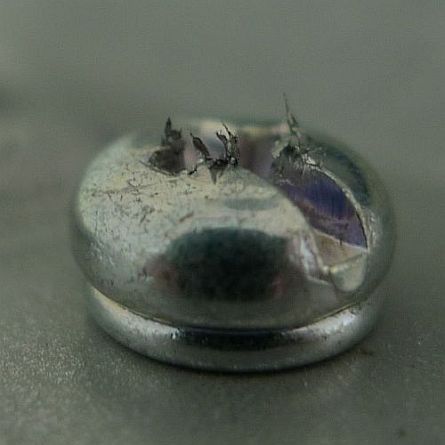
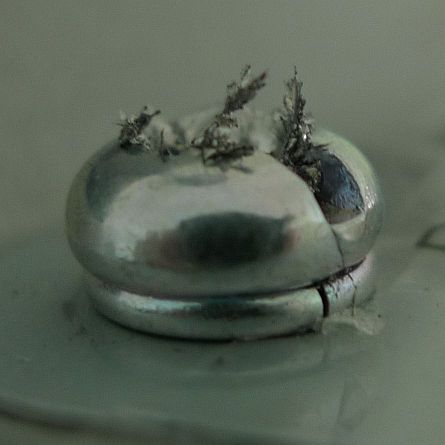
Here’s a view from the top. If not for the fact that this screw has a groove into which you can insert a flathead screwdriver, you probably won’t be able to remove this at all.
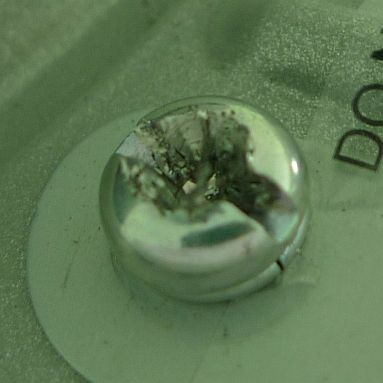
I actually needed to unscrew the bottom cover (which they term the canopy) to check if there’s a serial number printed on the motor hub. I’ve tried 3 different Phillips screwdriver and none of them can grip the screw properly.

The thing about using a power drill is it’s powerful – it really jams the screw in there tight. But if you abuse or misuse it like this, you will probably have a hard time trying to remove the screws, and when you do, you have to find a replacement screw.

So, why couldn’t the guy just have used a regular Phillips screwdriver? I think he was just fucking lazy. How would you feel if your factory-assembled products came with stripped screws like that?

Mac Battery Firmware Hacking

Charlie Miller reverse engineers the Mac battery firmware updater, sniffs battery communications on the SMBus, writes an IDA processor plugin (in IDAPython) for the CoolRISC 816 processor in the bq20z80, and mucks around with the its firmware.

All the source code and presentation materials are provided.

[via Dangerous Prototypes]

Coloured iteadstudio PCBs

Good news everyone! iteadstudio is offering coloured PCBs at a lower cost.

After I had my very first set of PCBs manufactured, I was thinking of making my next set of PCBs in a different colour. However I found the price difference to be quite big and might just stick with plain old boring green instead.

Now that they’ve announced their new offering, I’d definitely go for a different colour for my next batch. They’ll be offering 8 boards instead of 10 (which is not a problem at all for me), and fixed thickness of 1.6mm and HASL finish – all for an extra US$5 more than their base PCB service. Their available colours are blue, white, yellow, red and black.

[via Dangerous Prototypes]

Firefox Desktop Notifications for Gmail

At work, I use Google Chrome mostly. When I access Gmail, it asks if I wish to enable desktop notifications, but oddly at home I don’t see it. That’s because I use Firefox.

With so many tabs open, it’s definitely a good thing to have desktop notifications (something like Growl for Mac), especially since I use Google Chat on the Gmail page sometimes. I was hoping that Gmail detects a capable browser based on the availability of Javascript objects, instead of some stupid sites that detect the User Agent string, so that the functionality could at least be injected into the page using a Greasemonkey script or a Firefox plugin.

It turns out that someone has already written a Firefox plugin to implement desktop notifications, and that Gmail does in fact detect the presence of Javascript objects instead of blindly relying on the UA string. It’s called ff-html5notifications. With this plugin installed, Gmail will now ask if you want to enable desktop notifications, just as if you were using Chrome.

Chrome implements the Web Notifications API (draft specifications at this point) via the window.webkitNotifications object. It is unclear whether Firefox would support this API in the future, but the ff-html5notifications plugin provides a good solution for now.

Enable iOS 5 Multitasking Gestures on iPad 1

Now that iOS 5 has been released, it’s easy to enable multitasking gestures on the iPad 1, using the same trick as before for display mirroring.

Edit the /System/Library/CoreServices/Springboard.app/K48AP.plist file and add a boolean key multitasking-gestures in the capabilities dict, and set its value to true. You can add both display mirroring and multitasking gestures to the iPad 1 using this method.

That’s it!

Alternatively you can use Cydia or redsn0w to do this for you.