Infrared Remote Control Protocols: Part 2

In the previous post, techniques on how to capture an IR remote signal were presented and the most reliable one was using the Arduino sketch. The captured signal was also analyzed, although we had much of our work already done for us.

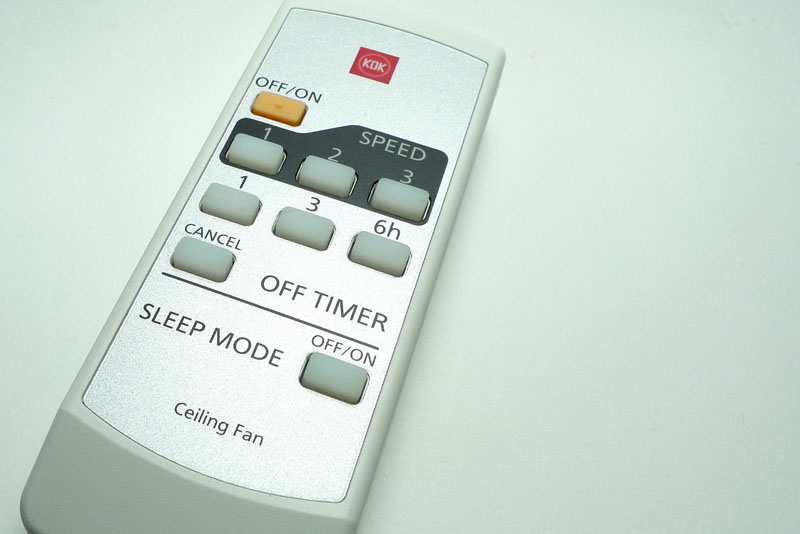
In this concluding post, a remote control whose protocol is unknown will be captured and analyzed as a case study. Lastly, we will cover the re-transmission of the IR signal. The remote control in question is for my ceiling fan, KDK model M56SR. The remote also works for two other fan models M56QR and M11SU.

KDK remote control

Continue reading

A Quick Tour of Singapore Mini Maker Faire 2012

Closest to the door, MarketAsia Distributors were selling Make Magazines, including the latest Vol 30.

Singapore Robotic (sgBotic) was also there showing off their products. They were using what looks like the Sparkfun thermal printer to print discount codes from an Arduino. I asked them if the printer was for sale and they said maybe soon.

Renesas Electronics Singapore was also there, showing off their GR-Sakura board which they hope will replace the Arduino. It’s powered by the RX63N series, clocked at 96MHz. It’s definitely more powerful than the Arduino as it has native USB capability as well as Ethernet connectivity, which looks like it’s connected via an SMSC USB-to-Ethernet controller, just like the Raspberry Pi.

As you can see, the board layout looks exactly like an Arduino, and from the overview sheet that I got from the booth, the pins seem to match up. I did inquire at the booth, but the Renesas guy didn’t know if it was the same layout.

Stephan February shows off his aquaphonics setup, consisting of plants and fishes (in a barrel below) in a symbiotic ecosystem. The plants get their nutrients from the fish waste, and the waste is broken down before it get back into their tank. He has a larger set up at home and grows his own vegetables.

The Tangible Programming Toolkit is made up of these little cubes which can be easily programmed via a simple GUI. The “program” is uploaded via XBee into these cubes and they can interact with each other. Each cube consists of an XBee with an Arduino Pro Mini.

The Portabee is a lower-cost, foldable 3D printer, which itself uses 3D-printed parts. It uses polylactic acid (PLA) instead of ABS for printing. From what I understand, the board design has been tweaked by them.

I regret not staying longer, taking more photos and chatting with more of the makers that day. That’s all I have for my tour of the Singapore Maker Faire 2012.

There were a lot of booths I did not cover, such as the Dangerous Prototypes booth where they had their Bus Pirate and the Logic Sniffer on display, and there were also several robots for the RoboCup. I saw a tesla coil at Derek Low’s booth, but much to my disappointment he said it wasn’t working.

More coverage can be found on the Singapore Maker Faire Facebook page.
Infrared Remote Control Protocols: Part 1

As I was perusing the SB-Projects site on the different IR protocol formats, I decided to make a summary but later found out that it was a pretty standard thing, as documented by a Vishay document “Data Formats for IR Remote Control” (pdf).

The infrared remote control signals are layered on top of a carrier signal of 36 or 38kHz, therefore the signal can only be “on” or “off”. A transmission typically starts with an a burst (“on” state) that is used for the Automatic Gain Control (AGC) circuitry in the receiver, followed by the “off” state and the actual data transmission.

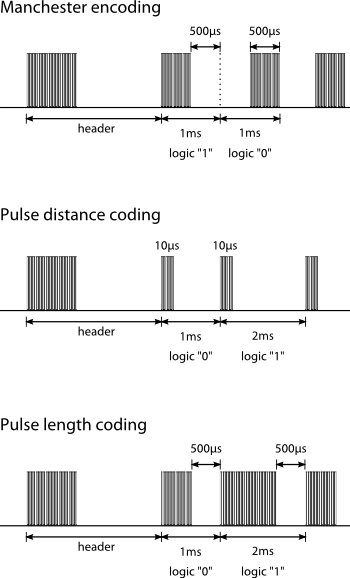
There are 3 basic types of data transmission formats, which are illustrated in the following diagram. Protocols can be based on these transmission formats, but need not necessarily conform to them.

Illustration of IR data transmission protocols: manchester encoding, pulse distance coding and pulse length coding.

So how do you know what your remote control uses? And how do you capture the sequence so that you can re-transmit it from an IR diode?

Continue reading

Adobe Flash Player is Crap

It seems that Adobe has been releasing Flash Player updates very often, and it’s getting a little irritating since I told it to “notify me to install updates”. I’m generally very against software that automatically updates itself (like Google Chrome).

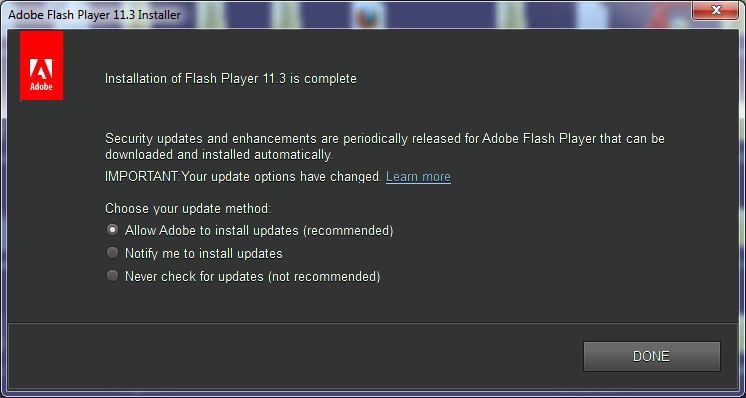
So recently an update popped up a couple of days ago, and I went ahead to install it. What’s really irritating is that it doesn’t keep my preference of “update method”. Here’s what I’m talking about:

I remember selecting the “Notify me to install updates” option the last time, and every time it installs a new update, the radio button goes back to “Allow Adobe to install updates”. Is there a technical reason why it could not have read my settings and defaulted to my previous choice? Absolutely not – it’s like those registration forms that automatically select the “send me your spam often” checkbox by default, except you’ll keep seeing this screen every time Adobe releases an update.

This time Flash Player was upgraded to the 11.3 series, and all of a sudden YouTube videos sound like I’m watching them in a cinema. Why? Because the new Flash Player decided to play the YouTube stereo audio stream in 5.1 instead. Wow, what a load of crap! Someone has also voiced this out in the Flash Player forum and his solution was to install the older 11.2 version.

If you found this irritating, you can go to the Archived Flash Player versions page and download a ~160MB zip file containing Flash Player installers for all 3 different platforms. I chose version 11.2.202.235 as suggested in the forum, and it fixed the problem.

As you can probably tell, I’m quite pissed by this to write such a lengthy rant. Horrible software like this just irritates the hell out of me.